Your account, ready in about ten minutes.
Four stages with OnsaFX: create your account, complete your profile, verify your documents, fund. Follow this page top to bottom and you'll be ready to connect the AI today.
Create your OnsaFX account
≈ 3 minutesUse the button below — it links your account to AscendAura so we can connect the AI later. Signing up any other way means we can't see your account.
- Under Account Type, select Individual, then pick your title (Mr, Ms or Dr).
- Enter your first, middle and last name exactly as they appear on your ID document. No middle name? Leave it blank.
- Enter an email address you actively use. Your MetaTrader 5 login details will be sent here once you're approved, so this one matters.
- Create a password: 8–20 characters with uppercase, lowercase, a number and a special character. The dot (.) isn't accepted as a special character.
- Select your Country of Residence, then enter your phone number without the leading 0 — the country code fills in automatically.
- Tick the checkbox, scroll to the end of the Terms agreement and hit "I agree to proceed", then Sign In.

Complete your profile
≈ 3 minutesInside the Client Portal, fill in the Personal Information page in full — the system won't let you upload documents until every required field is complete.
- Date of birth in day/month/year format, then gender and nationality.
- Enter your city and your postal code in the P.O. Box field. Your address must match the proof of residence document you'll upload next.
- Leave Referred By blank — your account is already linked to us through the signup button above.
- Answer "Are you a U.S. citizen?" — yes or no.
- Answer the PEP question. A Politically Exposed Person is a senior government, political, judicial or military figure, or a direct family member or close business associate of one. For almost everyone, the answer is No.
- Check everything, then hit Next to reach Document Upload.

Upload your verification documents
≈ 4 minutes + reviewTwo documents, both photographed with your phone. This is the KYC check every regulated broker runs once — pass it and your MetaTrader 5 account is created automatically.
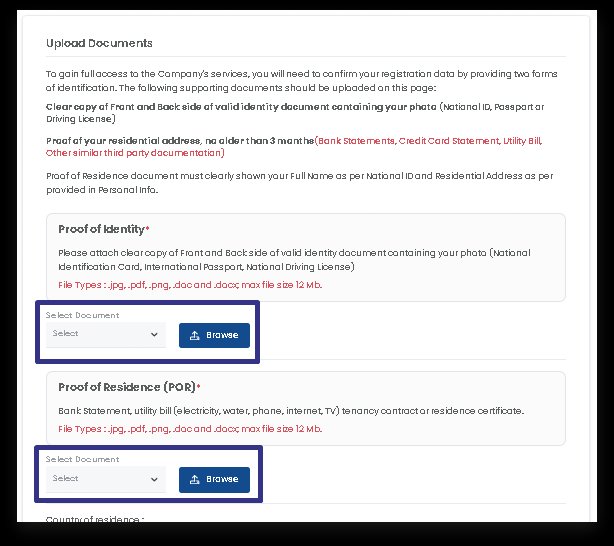
- Proof of identity — national ID, driver's licence or passport. Under "Select Document" pick your type, hit Browse and upload the front. For an ID card, upload the back too via "National ID Back". Original photos only — photocopies are rejected.
- Proof of residence — a recent utility bill (electricity, water, gas), bank statement or government e-portal document, no older than 3 months, registered in your name. The name and address must match your profile exactly.
After uploading, your documents show as "Processing" — received and in the review queue. Once they pass, the status flips to "Approved".

My document was rejected — what now?
Nine times out of ten it's glare, a cropped corner, or a name mismatch with your profile. Retake the photo in daylight and re-upload. Still stuck? Send us a message and we'll look at it with you.
Is my information safe?
Verification is handled entirely by OnsaFX under their regulatory requirements. AscendAura never sees or stores your documents.
Your trading account arrives by email
Automatic after approvalThe moment you're approved, OnsaFX creates your MetaTrader 5 (MT5) account automatically and emails your login details to your registered address.

Fund your account
≈ 3 minutesThe minimum to run the AI is $500 — the system sizes every trade in proportion to your balance, so it works the same at any amount above that.
- Open Deposit in your OnsaFX Client Portal.
- Pick your method. Card and bank transfer are the usual routes; crypto is fastest if you already hold it.
- Enter your amount and confirm. Card and crypto deposits usually land in minutes; bank transfers can take 1–2 business days.
Before you move on
30-second checkDeposit landed? You're one step from live.
The connection guide walks you through linking your account to the AI — it takes about five minutes.
Open the connection guide →